Starting a Business Website: The Complete Launch Guide
Most guides to launching a business website start after the hardest decisions are already made. They walk you through picking a template or comparing hosting plans, and they assume you’ve already settled on a platform, a budget, and a deadline. If you’re a first-time founder staring at a blank cursor, none of that helps yet.
Here’s a stat worth sitting with: according to Network Solutions’ 2026 small business statistics report, 83% of small businesses now have a website, up from 64% in 2018. Most of the content that got them there skips the two decisions you’re actually stuck on right now: what has to exist before you can call the site launched, and who’s actually going to build it. This guide covers both, in the order you’ll run into them.
I’ve spent over 20 years building websites, mostly for small businesses figuring this out for the first time, and this exact pattern shows up in nearly every first launch I’ve been part of.
Key Takeaways: Founders launching a first website are really making two decisions at once: what has to exist on day one, and who builds it. Most launch-ready sites need three things: a clear homepage, an offer or services page, and one way to contact or buy. A simple site can go live in days on a builder or subscription, while a professionally built small-business site typically takes 4-8 weeks. The build-path decision matters more than any single feature choice, because it determines how easily you can change the site once real customers start giving you feedback.
What Actually Needs to Exist at Launch
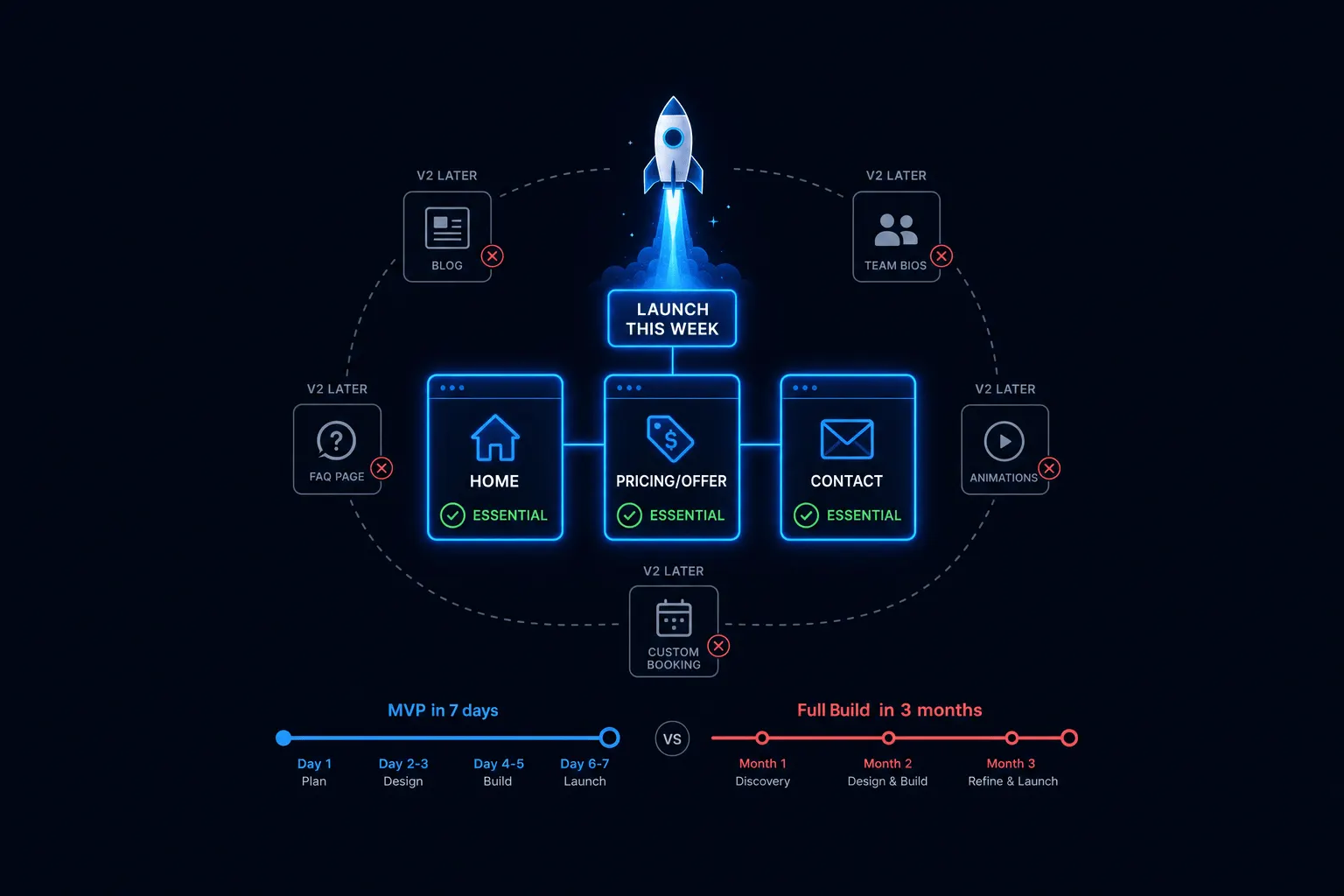
A launch-ready business website needs exactly three things: a homepage that states what you do in one clear sentence, an offer or services page that shows what you’re selling, and one obvious way for someone to contact or buy from you. That’s genuinely the whole list. Everything else, blog content, team bios, case studies, is a decision you get to make later, once the site is live and you have real customers to build around.
I wrote about this in more depth in what actually needs to be on your website at launch, which walks through the full page-by-page breakdown and two real client launches. The short version holds up on its own: speed to a clear, working site beats a longer feature checklist almost every time.
That matters because the failure mode here usually isn’t a skills problem. An industry estimate from UI Things’ 2026 website builder statistics roundup puts the share of people who’ve abandoned a website project without finishing it at 51%. In my experience, that’s rarely because someone couldn’t figure out the tools. It’s because the scope kept growing until the project became impossible to finish.
Choosing How to Build It: DIY, Freelancer, Agency, or Subscription
Once you know what has to exist, the next decision is who builds it. There are four real paths: a DIY builder platform, a freelance developer or designer, a full-service agency, and a flat-rate design subscription. None of them is objectively best. Each one trades speed, cost, and how easily you can change the site later, differently.
Most comparisons stop at speed and price. The axis that actually predicts regret two years in is different: can you still change this site once real customers start telling you what’s wrong with it? A one-time build treats launch as a finish line. A subscription treats it as a starting point.
| Build Path | Speed to Launch | Upfront Cost | Ease of Changing Later |
|---|---|---|---|
| DIY Builder | Days | $0-50 setup, then $17-50/mo | Easy, but limited to the platform’s tools |
| Freelancer | 2-6 weeks | $1,500-8,000 typical project | Each change is a new invoice |
| Agency | 6-12+ weeks | $5,000-20,000+ | Slow and often costly after handoff |
| Subscription | Days to a few weeks | Low to none | Included in the flat rate, ongoing |
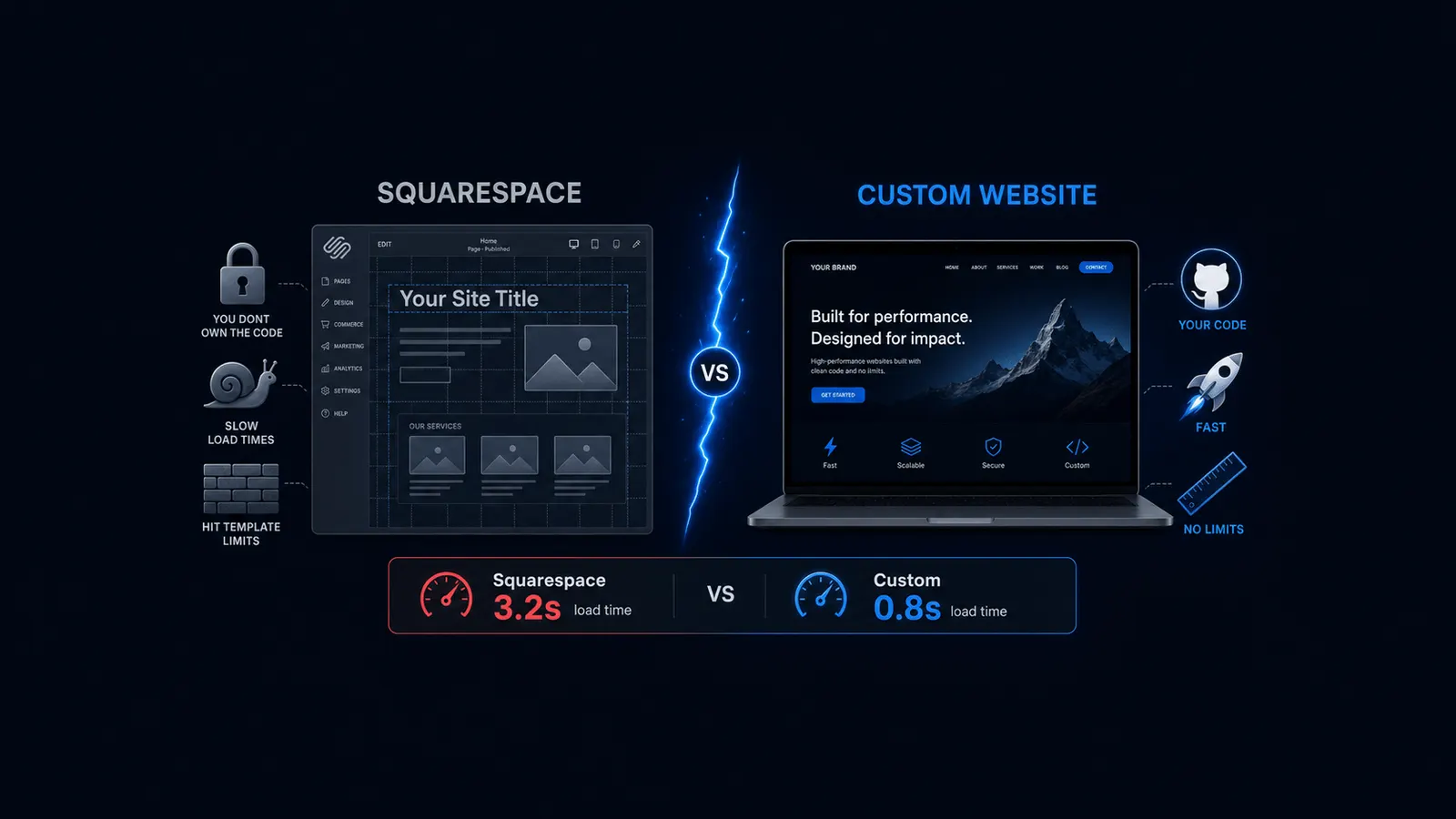
The dollar ranges above deserve some honesty. DIY builders like Wix and Squarespace run roughly $17-50 a month once you’re past the entry tier, though I’d rather point you toward Wix’s and Squarespace’s own current pricing pages than repeat a number here that could be stale by the time you read this; both platforms adjust tier pricing without much notice. Freelance developers typically charge $50-150 an hour, and most small-business freelance projects land somewhere between $1,500 and $8,000 depending on scope, per cost breakdowns from FreelanceNation and GruffyGoat.
If you’re specifically weighing DIY against hiring a professional, I go deep on that exact decision in DIY Website vs. Professional: An Honest Comparison. And if you’re comparing a builder platform against hiring a developer more generally, that comparison lives in Website Builder vs. Web Developer: Which Fits Your Business.
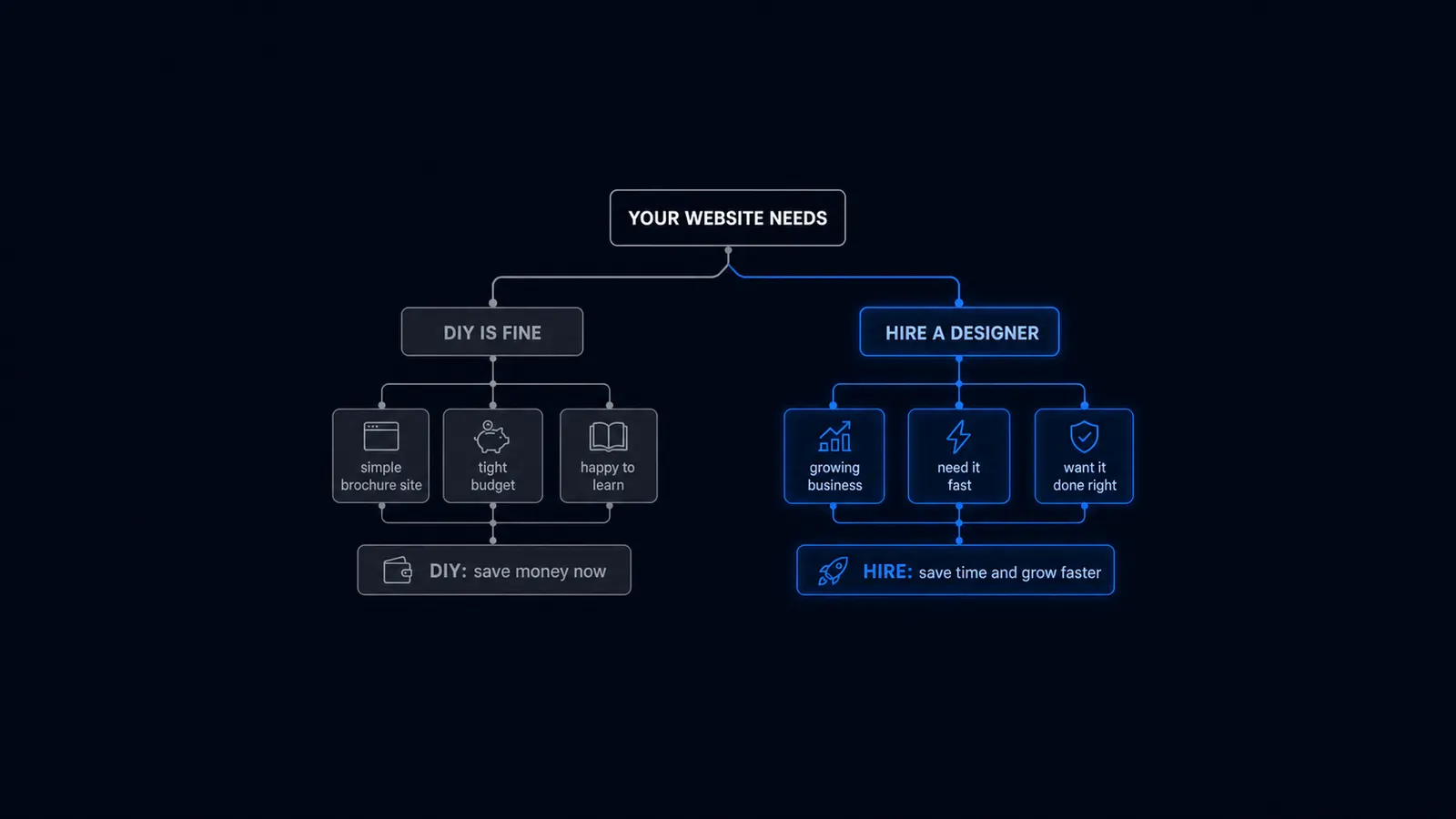
As a quick gut check: DIY tends to fit a simple, single-location offer with an owner who has time for upkeep. A freelancer fits a one-off custom project with a clear scope and no need for frequent post-launch changes. An agency fits a business ready for a larger, higher-touch engagement with a budget to match. A subscription fits a business that expects to keep changing the site as it learns what’s actually working.
Realistic Timeline Expectations
A simple site can go live in days on a builder platform or a subscription model. A professionally built small-business site, one with custom pages, real copy, and design work tailored to the business, typically takes 4-8 weeks, per timeline guides from Elementor and Moptimize. Neither number is fixed. Both depend heavily on one thing that has nothing to do with which path you pick.
That one thing is content readiness. Across every build path, the single biggest cause of delay isn’t design or development time, it’s the back-and-forth over copy and images, according to a 2026 build-timeline breakdown from webChamploo. I’ve seen three-week delays on projects that should’ve taken five days, purely because the founder wasn’t ready with headline copy, pricing, or photos on day one. Set your timeline by how ready your content is, not by which path you choose.
None of this means you should rush content just to hit a shorter timeline. A homepage headline that’s accurate and specific beats a fast one that says nothing. Give yourself enough time to get that part right, even if everything else moves quickly.
Common Launch Mistakes First-Time Founders Make
These four mistakes account for most of the delayed and abandoned launches I’ve seen over the years. None of them are about lacking skill or budget. They’re about scope.
- Scope creep: adding a blog, FAQ, or team bio page before there’s traffic or a team to write bios for
- Picking a platform before deciding what the site actually needs to do in year one
- Treating launch as a final version instead of a first version you’ll keep improving
- Waiting for perfect: every week of delay is a week you can’t convert the customers already looking for you
Watch for these especially if you’ve been researching for weeks already. The longer you’ve been planning without shipping anything live, the more likely one or more of these has already crept into your plan.
That last mistake is worth sitting with. If your average customer is worth even a modest amount and you could realistically close one a week, three months of waiting for the right design adds up to real, compounding lost revenue. Done and live beats perfect and delayed almost every time.
What to Do If You’re Not Sure You’re Ready to Hire Anyone Yet
If you’re reading all of this and still not sure whether you should do it yourself or pay someone, that’s a completely reasonable place to be. DIY is genuinely fine for a real share of businesses at this stage, not a fallback you settle for until you can afford better. I wrote a full, honest threshold checklist in When to Hire a Web Designer (and When DIY Is Still Fine), built specifically to help you figure out which one you are.
This page is the hub for a broader set of guides on exactly these decisions. If one specific part, choosing a build path, understanding what Wix or Squarespace really costs, or deciding when it’s actually time to hire, is the part blocking you right now, read that piece next rather than trying to solve everything from this one page.
Frequently Asked Questions
How long does it take to launch a business website? A simple builder or subscription site can go live in days. A professionally built small-business site typically takes 4-8 weeks. The real variable in either case is how ready your content, copy, pricing, and images, is before the build even starts.
Do I need a developer to launch my first website? Not necessarily. It depends on how complex your offer is and how much your own time is worth. Our full comparison of DIY vs. professional walks through exactly when hiring starts to make more sense than building it yourself.
What’s the cheapest way to launch a business website? A DIY builder is cheapest upfront, running roughly $17-50 a month. That number carries some hidden costs and limits worth knowing before you commit, which I break down in Website Builder Hidden Fees.
Should I launch with a blog already built? No. Launch with your offer and a clear way to contact or buy first. Add a blog once you have traffic worth serving with content, not before.
What if I need to make changes after launch? This is the biggest hidden differentiator between build paths. A one-time freelance or agency build makes every future change a new invoice and a new wait. A subscription model, or a DIY platform you’re comfortable editing yourself, keeps changes cheap and fast, which matters more than almost anything else once real customers start giving you feedback.
The Bottom Line
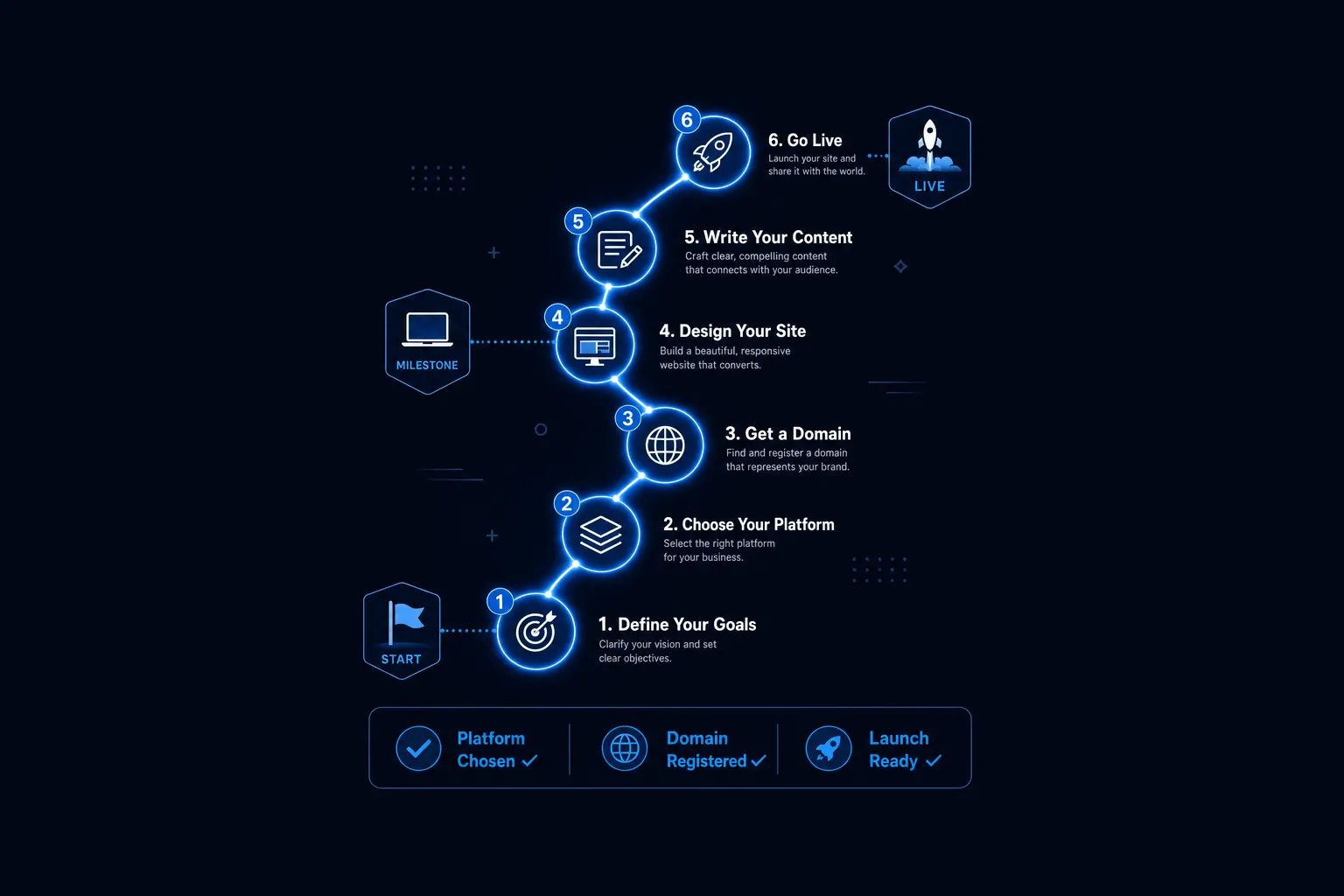
Launching a business website isn’t one decision, it’s two, made at the same time and under the same deadline: what has to exist, and who builds it. Get the first one right by keeping the launch list to a homepage, an offer page, and one way to buy or contact you. Get the second one right by being honest about your budget, your timeline, and how much of the ongoing maintenance you actually want to be responsible for.
Neither decision has one universally correct answer. The businesses that launch successfully are the ones that pick a lane, ship something real, and improve it once actual customers are using it, not the ones waiting for a perfect version that never quite arrives.
If you’d rather talk through your specific situation than read another roundup article, book a free consultation and we’ll help you find the fastest realistic path to a launched, working website for your business.
Ready to put this into practice? Explore our web design services, view plans & pricing, or book a free consultation — no pressure, just honest advice.