Headless CMS and SEO: What Changes, What Doesn't
“Will switching to headless CMS hurt my SEO?” The straight answer, up front: not by default. Google has stated its ranking systems don’t look for what CMS a site runs on. But that answer needs real nuance behind it, because specific implementation choices in a headless setup absolutely can hurt your rankings if you get them wrong.
Most content on this exact question mixes “headless CMS” together with “single-page JavaScript app,” treating them as the same risk. They’re not, and that distinction is the whole point of this post.
Key Takeaways: Going headless doesn’t inherently help or hurt SEO; Google has stated its algorithms don’t look for CMS-specific signals. What changes is how your pages get built and delivered to a crawler, and that part matters. Done right, with static generation or server-side rendering (what Astro uses by default), a headless site can crawl and index cleanly. Done wrong, with content that only loads via client-side JavaScript and no pre-rendering, it can create real indexing problems.
What Headless Changes About Rendering and Crawlability
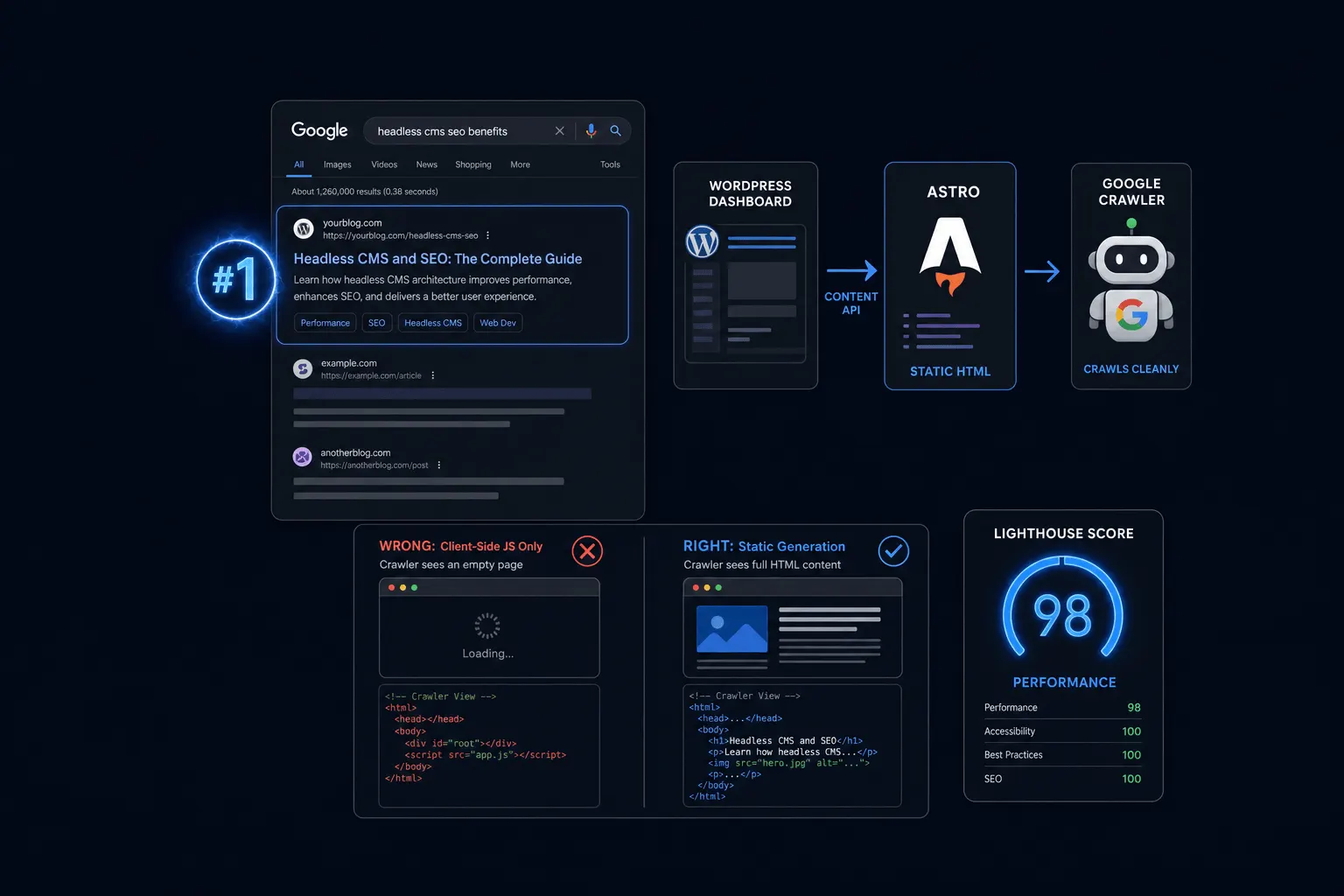
The core technical shift is how your page’s HTML gets built and handed to a search engine crawler. Traditional WordPress builds that HTML live on the server for every visit, including crawler visits. A headless setup can do this several different ways, and the choice you make actually matters.
Here’s the risk case, stated plainly. If a headless front end relies only on client-side JavaScript to render content, meaning nothing meaningful shows up in the initial HTML a crawler receives, search engines can struggle to see the actual content. Google’s John Mueller has addressed rendering and indexing risk publicly on this point, and it’s a well-documented concern in technical SEO circles.
Here’s the safe case. Static site generation, which is what Astro does by default, or server-side rendering, delivers fully-formed HTML to the crawler on the first request. There’s no gap between what a crawler sees and what a visitor sees, which avoids the client-side-rendering risk entirely.
What Stays Exactly the Same
Everything that isn’t about page-building technology stays exactly the same. Google has stated its ranking systems don’t look for CMS-specific signals, so content quality, backlinks, page titles, meta descriptions, internal linking, and schema markup all matter exactly as much as they did before you went headless.
Google’s John Mueller has said directly, in a public Google Search Central video, that the algorithm doesn’t check what CMS a site runs on. I’d say that plainly rather than gloss over it: the CMS itself was never the ranking factor. The implementation choices built around it are. If your headless site delivers clean, crawlable HTML and keeps its content quality and link structure intact, there’s no inherent SEO penalty for the architecture underneath it.
Where Headless SEO Actually Goes Wrong
The real risk isn’t “headless.” It’s specific implementation mistakes that happen to show up more often in headless migrations.
Client-side-only rendering is the biggest one, covered above. Broken or JavaScript-dependent internal links are another; if your navigation only works after JavaScript executes, a crawler can miss it entirely. Missing redirects and changed URL structure during a migration is a classic, avoidable mistake that has nothing to do with headless specifically but shows up constantly during any redesign. Lost metadata and schema markup rounds it out: a traditional WordPress theme often handled structured data automatically through a plugin, and that has to be deliberately rebuilt in a new headless front end rather than assumed to carry over.
Best Practices to Protect SEO in a Headless Setup
A short, concrete checklist protects most of what actually matters.
- Use static generation or server-side rendering, not client-side-only rendering
- Use standard, crawlable anchor links for internal navigation, not JavaScript-only navigation
- Maintain a clean URL structure and proper 301 redirects through any migration
- Keep structured data (schema) and metadata intact and deliberately rebuilt in the new front end
Astro satisfies the first and most important item on that list by default, since static generation is how it builds pages out of the box, without extra configuration. That’s one less thing to get wrong during a migration. Page speed is also worth keeping in mind here: Core Web Vitals are an established, Google-confirmed ranking signal, and industry roundups note that roughly 91 percent of pages ranking in Google’s number one position pass all three Core Web Vitals thresholds. That’s a strong argument for getting rendering right, beyond just avoiding an indexing problem.
What This Looks Like on a Real Migration
Everything in this post applies to any website redesign, headless or not. If you’re planning a broader redesign and want the complete migration checklist, including URL mapping, redirect strategy, and content preservation, our full redesign-without-losing-SEO guide covers it in depth rather than duplicating that ground here.
Frequently Asked Questions
Does headless CMS hurt SEO? Not inherently. Google doesn’t check what CMS a site runs on, but poor rendering implementation can create real indexing problems.
Do I need server-side rendering for headless SEO to work? Server-side rendering or static generation, what Astro uses by default, both work. Pure client-side rendering with no pre-rendering is the risky option.
Will I lose my rankings during a move to headless? Only if the migration itself is handled poorly, through broken redirects, changed URLs, or lost content. See our full redesign-without-losing-SEO guide for the complete checklist.
Does schema markup still work with a headless CMS? Yes, but it has to be deliberately carried into the new front end rather than assumed, since a traditional WordPress theme often handled it automatically through a plugin.
The Bottom Line
Headless CMS and SEO coexist just fine, as long as the rendering choice underneath it delivers real, crawlable HTML. The architecture was never the risk. Client-side-only rendering, broken links, and a sloppy migration are. Get the rendering approach right, protect your URLs and redirects, and rebuild your schema deliberately, and there’s no reason a move to headless should cost you rankings.
Want the bigger picture on why we built our own stack this way? Start with our plain-English breakdown of headless CMS, or see the real numbers behind our own migration in our case study running Astrobot.design on headless WordPress.
Ready to put this into practice? Explore our web design services, view plans & pricing, or book a free consultation — no pressure, just honest advice.