Website Maintenance Plans Explained: What's Actually Included
“Website maintenance plan” shows up on invoices anywhere from $25 a month to $600 or more, and almost nobody explains why the range is so wide. I’ve watched clients assume a cheap plan and an expensive plan cover the same ground, just at different service levels. They usually don’t. A $25 plan might mean plugin updates and nothing else. A $300 plan might bundle backups, security monitoring, and content edits. Same label, five completely different jobs hiding underneath it.
That’s the actual problem with how this category gets sold: “maintenance” isn’t a standardized term, so the price tells you almost nothing on its own. What tells you something is knowing which of five separate jobs you’re actually paying for. This post breaks those five jobs down individually, with real cost ranges for each, so you can hold any provider’s quote up against them and see exactly what you’re buying, and what you’re not.
Key Takeaways: A website maintenance plan is really five separate jobs bundled under one name: hosting, domain/email, software updates, security and backups, and content edits. Full-service plans commonly run $100 to $300 a month; bare-bones update-only plans can start near $25. Know which of the five jobs your price actually covers before you sign anything.
What a Website Maintenance Plan Actually Covers
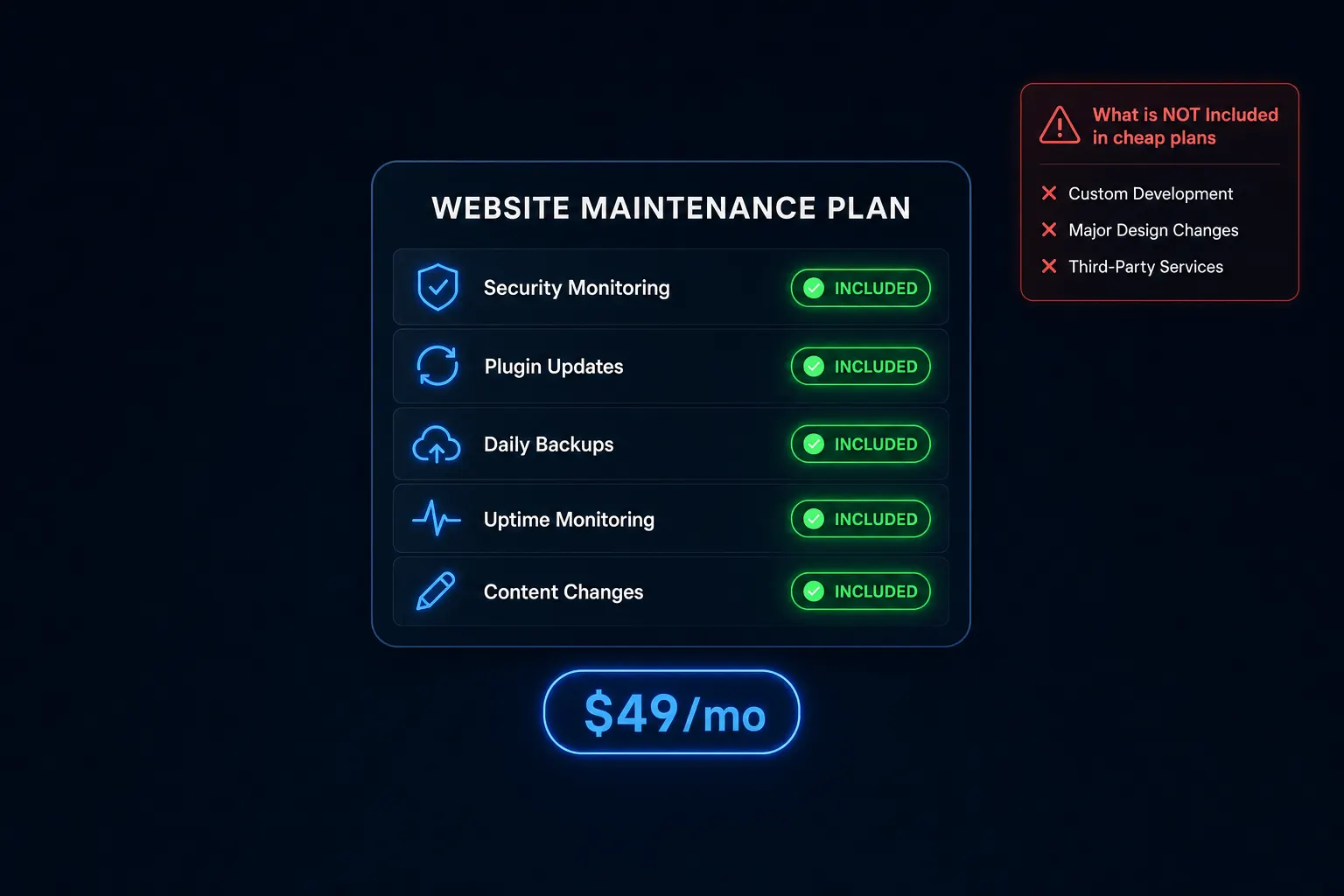
A maintenance plan is really five separate jobs sold under one name: hosting, domain and email, software and plugin updates, security and backups, and content edits. Any single plan might bundle all five, a few, or just one, and the price you’re quoted depends entirely on which combination you’re getting. Industry roundups commonly cite $25 to $600-plus a month as the full range, and that spread makes a lot more sense once you know it’s really tracking how many of those five jobs are included.
Hosting is the server space that keeps your site online and loading; it’s a utility, not a service someone actively manages for you unless that’s specified separately. Domain and email cover the registration and inbox tied to your business name. Software and plugin updates mean someone is actually installing the patches WordPress and its plugins release, often weekly, so known security holes get closed before something exploits them. Security and backups mean monitoring for intrusions and keeping a recent, restorable copy of your site if something breaks or gets hacked. Content edits mean someone updates your hours, adds a page, or swaps out a photo when you ask.
Backups specifically deserve a plain-language explanation, since the word gets thrown around loosely. A real backup is a complete, restorable snapshot of your site’s files and database, taken on a set schedule, that a provider can actually roll back to if something goes wrong. A provider claiming backups without saying how often, or where they’re stored, isn’t giving you much.
What Website Maintenance Typically Costs
Small-to-mid-size businesses commonly land around $100 to $300 a month for full-service care, covering most or all five jobs above. Looked at annually, that’s roughly $3,600 up to $50,000 a year depending on site complexity, according to cost breakdowns published by agencies in this space. I’d treat those as industry-typical ranges rather than a precise, independently audited figure, since most of this pricing data comes from agencies publishing their own numbers to attract leads, not from neutral third-party research.
Broken into line items, published ranges commonly look like this: domain registration $10 to $130 a year, SSL certificates $8 to $60 a year, hosting $2 to $500 a month, general upkeep $15 to $105 a month, CMS maintenance anywhere from $0 to $3,500 a month, tech support $0 to $3,000 a month, and plugin updates $0 to $50 a month. The wide spans reflect everything from a bare-bones static site to a complex e-commerce build with dozens of integrations.
| Line Item | Typical Range |
|---|---|
| Domain registration | $10–$130/year |
| SSL certificate | $8–$60/year |
| Hosting | $2–$500/month |
| General upkeep | $15–$105/month |
| CMS maintenance | $0–$3,500/month |
| Tech support | $0–$3,000/month |
| Plugin updates | $0–$50/month |
E-commerce and high-traffic sites commonly run $200 to $600-plus a month, and the reason is straightforward: more moving parts (inventory syncs, payment processing, customer data) means a bigger security surface and more that can actually break.
What Gets Upsold Separately (Even When It Sounds Included)
A recurring pattern across this category, without naming any specific provider as the villain, is a maintenance plan that only covers a small amount of developer time, sometimes as little as 1 hour a month, before anything beyond that gets billed as extra work. That’s fine as a structure, as long as it’s disclosed clearly. It’s a problem when a low intro price implies more coverage than it actually delivers.
Daily backups, advanced security monitoring, and extra storage are the three things I see held back most often from a cheap entry tier and reintroduced later as paid upgrades. None of that is dishonest on its own, but it means the number on the landing page isn’t the number you’ll actually pay once you need what most people assume “maintenance” already includes. If you want the deeper breakdown of exactly which patterns to watch for and the questions that expose them, this piece on hidden costs in website care plans goes further into it.
Do You Actually Need a Maintenance Plan?
Yes, in some form. An unmaintained WordPress site with outdated plugins is a real, ongoing security risk, not a theoretical one; that’s one of the more consistent things I’ve seen across two decades of hands-on WordPress work. Vulnerabilities get discovered constantly, and plugins that don’t get patched are how most compromised small-business sites actually get compromised.
The level of plan you need scales with complexity, though, not with fear. A static, low-complexity small-business site (a handful of pages, no e-commerce, no login system) needs a lot less ongoing intervention than an e-commerce site handling customer data and running a dozen plugins that all need to stay current together.
What’s Included in Astrobot’s Plans
Astrobot’s own plans, Orbit at $49 a month and Supernova at $79 a month, both include hosting, ongoing design changes through a dedicated designer, SEO optimization, and mobile responsiveness at no extra charge. There’s no separate invoice for hosting, no separate invoice for backups, no separate invoice for “just one more edit.” You can see the full breakdown on the pricing page, and what’s covered in the hosting and care side specifically on Astrobot’s hosting and care plan page.
Set against the five-jobs framework above, that means both plans cover hosting, updates, security, and content edits under one flat number, rather than pricing each job separately and letting the total climb as you discover what wasn’t included.
Frequently Asked Questions
What’s the difference between hosting and maintenance? Hosting is just keeping the site online. Maintenance covers updates, security, backups, and content changes on top of that.
How often should a website get backed up? Daily is the standard the industry treats as normal. Anything less frequent is a real risk if something breaks between backups.
What happens if I don’t maintain my website? Outdated software becomes a security vulnerability, and small content and technical issues compound over time into bigger, more expensive problems.
Is website maintenance the same as a subscription web design plan? Not always. Some maintenance plans cover technical upkeep only, with no design work included. Astrobot’s plans bundle both.
How much should I expect to pay per month for basic maintenance? Most small businesses land in the $100 to $300 range for full-service care from a professional provider, though bare-bones, update-only plans can run as low as $25.
The Bottom Line
The next time a “maintenance plan” line item shows up on a quote, ask which of the five jobs it actually covers: hosting, domain and email, updates, security and backups, and content edits. That question alone will tell you more than the price will. To see what a subscription that bundles the design and technical side together looks like from the start, this guide to how web design subscriptions bundle maintenance is a useful next read.
If you’d rather see exactly what’s included at a flat monthly price, check what’s covered in Astrobot’s hosting and care plan.
Ready to put this into practice? Explore our web design services, view plans & pricing, or book a free consultation — no pressure, just honest advice.